
百度智能小程序 视频
video 视频
解释:视频(v3.70.0 起支持 同层渲染 )。video 组件还提供丰富的 api 来控制视频的播放、暂停、全屏、弹幕等,详见 swan.createVideoContext 。
属性说明
| 属性名 | 类型 | 默认值 | 必填 | 说明 | 最低支持版本 | Web 态说明 |
|---|---|---|---|---|---|---|
|
src |
String |
是 |
视频的资源地址,支持云文件 ID。 |
3.120.2
|
不支持设置云文件 ID |
|
|
title |
String |
否 |
视频标题,全屏时在视频顶部展示。 |
3.120.2
|
暂不支持,video 全屏模式无标题 |
|
|
initial-time |
Number |
否 |
指定视频初始播放位置 |
- | - | |
|
controls |
Boolean |
true |
否 |
是否显示默认播放控件(播放/暂停按钮、播放进度、时间) |
- | - |
|
autoplay |
Boolean |
false |
否 |
是否自动播放 |
- |
存在浏览器兼容问题,详见下方 Web 态 Tip1 |
|
loop |
Boolean |
false |
否 |
是否循环播放 |
- | - |
|
muted |
Boolean |
false |
否 |
是否静音播放 |
- | - |
|
objectFit |
String |
contain |
否 |
当视频大小与 video 容器大小不一致时,视频的表现形式。contain :包含,fill :填充,cover :覆盖 |
- | - |
|
poster |
String |
否 |
视频封面的图片网络资源地址,支持云文件 ID。 |
3.120.2
|
- | |
|
page-gesture |
Boolean |
false |
否 |
在非全屏模式下,是否开启使用手势调节亮度与音量,兼容 vslide-gesture 属性。 |
- |
此属性对 Web 态不生效 |
|
direction |
Number |
否 |
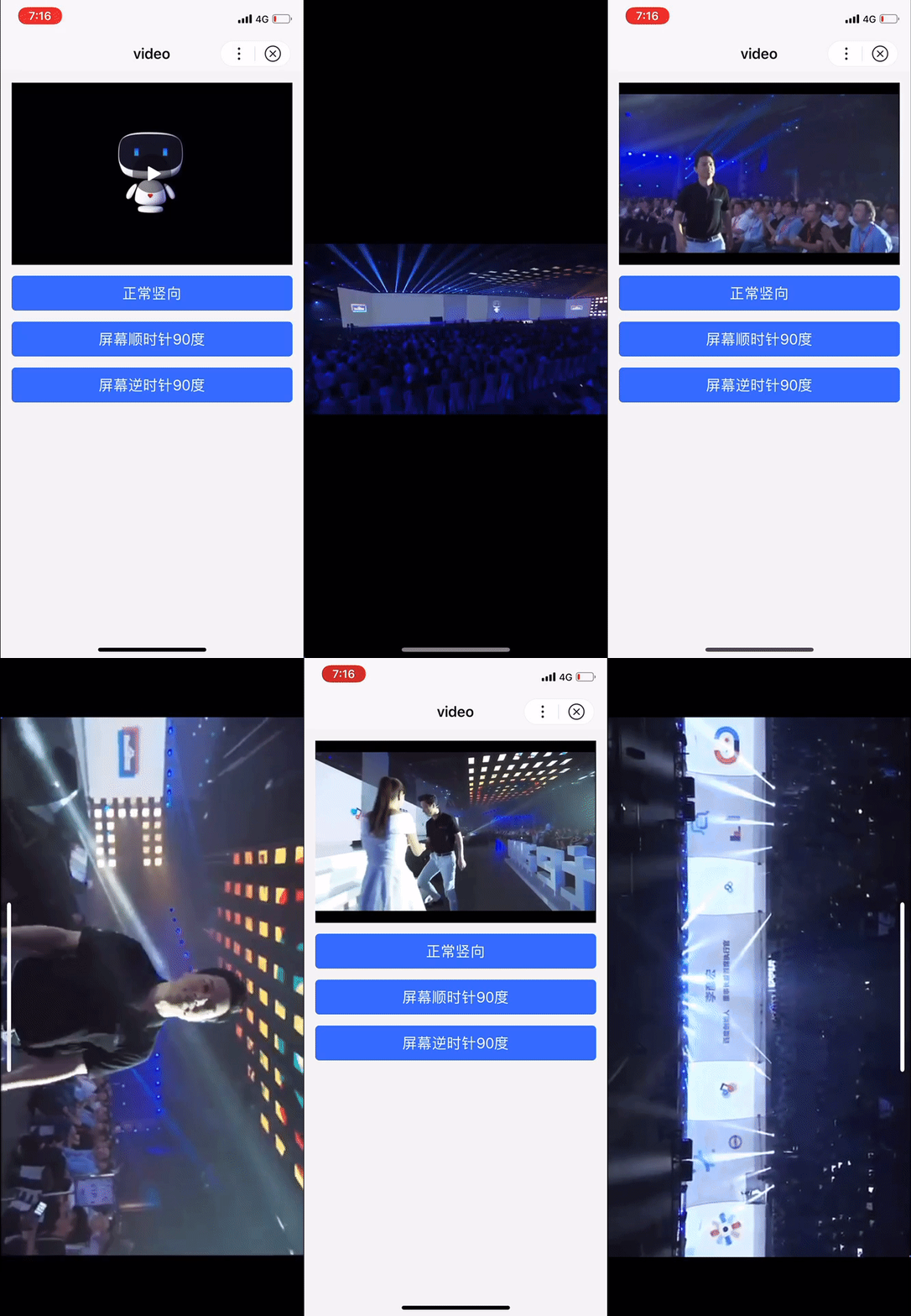
按设置的视频全屏方向进入全屏。不指定视频全屏方向时则根据设备方向判断全屏方向。0:正常竖向,90:屏幕顺时针 90 度,-90:屏幕逆时针 90 度。 |
3.90.29
|
暂不支持 |
|
|
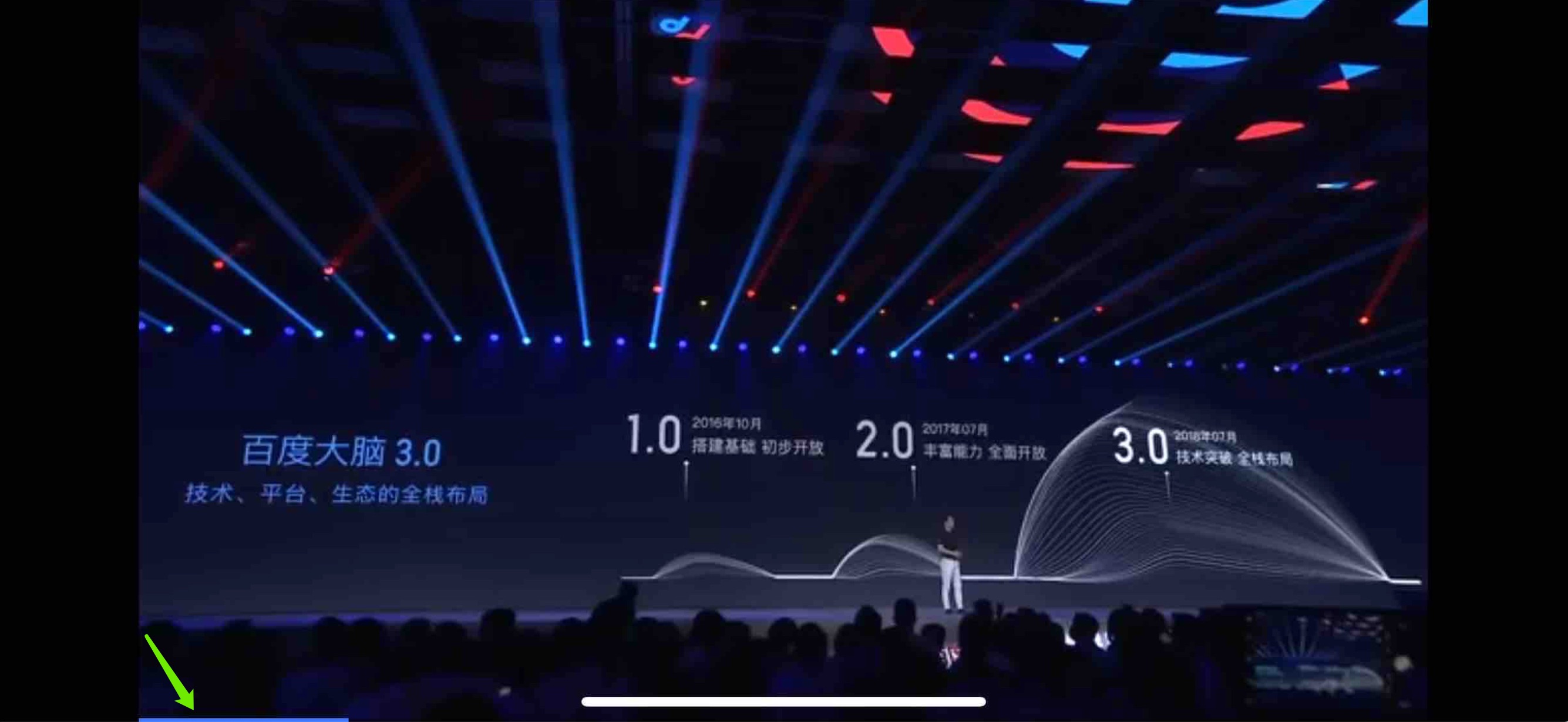
show-progress |
Boolean |
true |
否 |
若不设置,宽度大于 240 时才会显示。 |
- | - |
|
show-fullscreen-btn |
Boolean |
true |
否 |
是否显示全屏按钮 |
- | - |
|
enable-progress-gesture |
Boolean |
true |
否 |
是否开启使用手势控制进度 |
- |
此属性对 Web 态不生效 |
|
danmu-list |
Array.<object> |
否 |
弹幕列表 |
- | - | |
|
danmu-btn |
Boolean |
false |
否 |
是否显示弹幕按钮,只在初始化时有效,不能动态变更。 |
- |
此属性对 Web 态不生效 |
|
enable-danmu |
Boolean |
false |
否 |
是否展示弹幕,只在初始化时有效,不能动态变更。 |
- | - |
|
show-play-btn |
Boolean |
true |
否 |
是否显示视频底部控制栏的播放按钮 |
- | - |
|
show-center-play-btn |
Boolean |
true |
否 |
是否显示视频中间的播放按钮 |
- |
Web 态下,中间播放按钮暂不支持隐藏,设置为 false 不生效 |
|
show-mute-btn |
Boolean |
false |
否 |
是否显示静音按钮。 |
3.120.2
|
Web 态下,静音按钮暂不支持隐藏,设置为 false 不生效 |
|
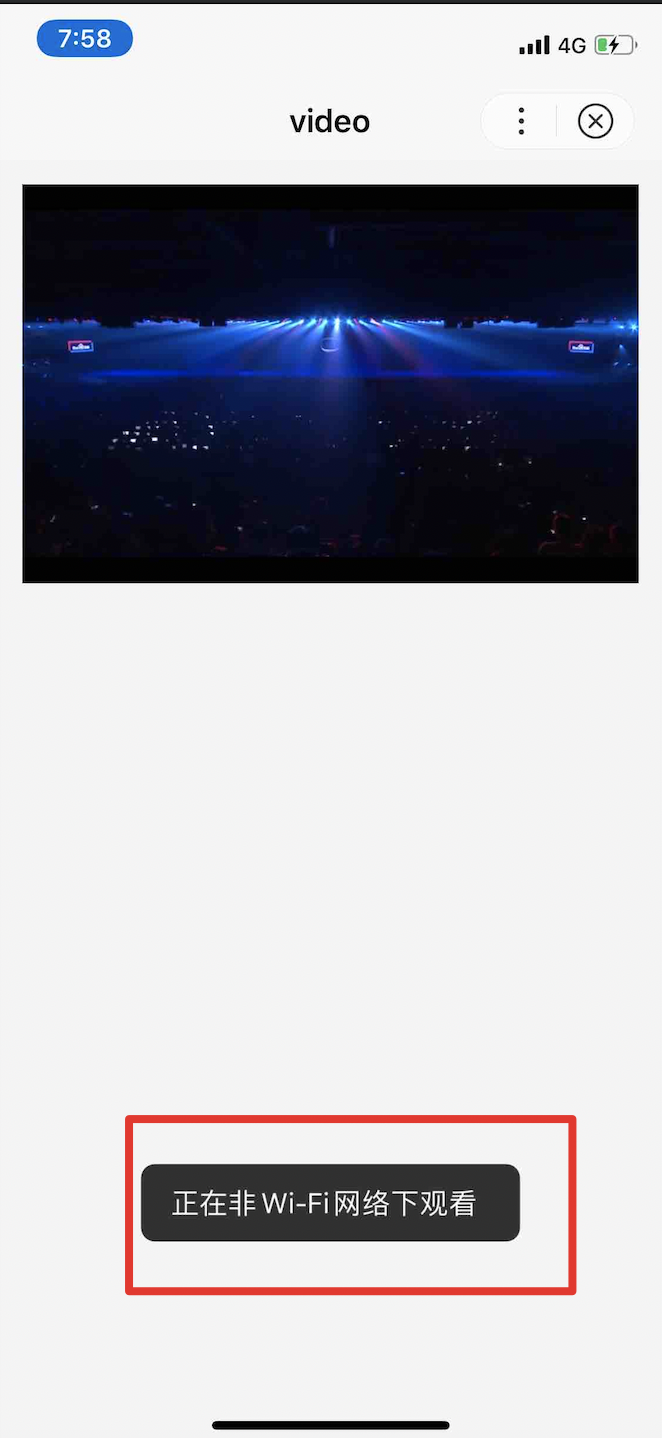
show-no-wifi-tip |
Boolean |
true |
否 |
非 wifi 环境下是否显示继续播放浮层。 |
3.100.4
|
此属性对 Web 态不生效 |
|
vslide-gesture |
Boolean |
false |
否 |
非全屏模式下,是否开启亮度与音量调节手势,兼容 page-gesture 属性 。 |
3.120.2
|
此属性对 Web 态不生效 |
|
vslide-gesture-in-fullscreen |
Boolean |
true |
否 |
全屏模式下,是否开启亮度与音量调节手势。 |
3.120.2
|
此属性对 Web 态不生效 |
|
enable-play-gesture |
Boolean |
false |
否 |
是否开启播放手势,即双击切换播放/暂停。 |
3.120.2
|
此属性对 Web 态不生效 |
|
show-rate-btn |
Boolean |
false |
否 |
是否显示倍速播放按钮 |
3.170.2
|
- |
|
show-vslide-btn-in-fullscreen |
Boolean |
true |
否 |
全屏模式下,是否显示侧边栏控制按钮 |
3.170.2
|
此属性对 Web 态不生效 |
|
silent-play |
Boolean |
false |
否 |
是否进入无声视频模式,进入无声视频模式后,视频将静音播放且不响应系统物理音量变化,点击播放器提示无声视频,手势调节失效 |
3.170.2
|
此属性对 Web 态不生效 |
|
bindplay |
EventHandle |
否 |
当开始播放时触发 play 事件 |
- | - | |
|
bindpause |
EventHandle |
否 |
当暂停播放时触发 pause 事件 |
- | - | |
|
bindended |
EventHandle |
否 |
当播放到末尾时触发 ended 事件 |
- | - | |
|
bindtimeupdate |
EventHandle |
否 |
播放进度变化时触发,event.detail = {currentTime, duration} 。 |
- | - | |
|
bindfullscreenchange |
EventHandle |
否 |
当视频进入和退出全屏时触发,event.detail = {fullscreen, direction},direction 取为 vertical 或 horizontal |
- | - | |
|
bindwaiting |
EventHandle |
否 |
视频出现缓冲时触发 |
- | - | |
|
binderror |
EventHandle |
否 |
视频播放出错时触发 |
- |
Web 态目前触发 error 后直接展示默认错误信息,不执行开发者的 error 回调函数 |
|
|
bindloadedmetadata |
EventHandle |
否 |
视频元数据加载完成时触发。 event.detail = {width, height, duration} |
3.180.1
|
- |
objectFit 有效值
| 值 | 说明 |
|---|---|
|
contain |
包含 |
|
fill |
填充 |
|
cover |
覆盖 |
direction 有效值
| 值 | 说明 |
|---|---|
|
0 |
正常竖向 |
|
90 |
屏幕顺时针 90 度 |
|
-90 |
屏幕逆时针 90 度 |
主流格式支持
| 格式 | Android | IOS | Web 态 |
|---|---|---|---|
|
mp4 |
是 |
是 |
是 |
|
mov |
是 |
是 |
是 |
|
m4v |
是 |
是 |
是 |
|
3gp |
是 |
是 |
否 |
|
avi |
是 |
是 |
否 |
|
m3u8 |
是 |
是 |
是 |
|
webm |
是 |
否 |
否 |
|
flv |
是 |
是 |
否 |
|
mkv |
是 |
是 |
否 |
|
rmvb |
是 |
是 |
否 |
|
rm |
是 |
是 |
否 |
|
ogg |
是 |
是 |
是 |
主流编码格式支持
| 格式 | Android | IOS |
|---|---|---|
|
H.263 |
是 |
是 |
|
H.264 |
是 |
是 |
|
HEVC |
是 |
是 |
|
MPEG-4 |
是 |
否 |
|
VP8 |
是 |
否 |
|
VP9 |
是 |
否 |
示例

代码示例 1
<view class="wrap">
    <view class="card-area">
        <video
            style="width: 100%;"
            id="myVideo"
            title="这是title"
            src="{{src}}"
            initial-time="{{initialTime}}"
            duration="48"
            controls="{{controls}}"
            autoplay="{{false}}"
            loop="{{false}}"
            muted="{{voice}}"
            objectFit="{{objectFit}}"
            poster="{{posterSrc}}"
            page-gesture="{{pageGesture}}"
            direction="{{0}}"
            show-progress="{{progressGesture}}"
            show-fullscreen-btn="{{fullscreenBtn}}"
            enable-progress-gesture="{{false}}"
            danmu-list="{{danmuList}}"
            danmu-btn="{{true}}"
            enable-danmu="{{true}}"
            show-play-btn="{{playBtn}}"
            show-center-play-btn="{{centerPlayBtn}}"
            show-mute-btn="{{true}}"
            show-no-wifi-tip="{{noWifiTip}}"
            show-rate-btn="{{showRateBtn}}"
            show-vslide-btn-in-fullscreen="{{showVslideBtnInFullscreen}}"
            silent-play="{{silentPlay}}"
            vslide-gesture="{{true}}"
            vslide-gesture-in-fullscreen="{{true}}"
            enable-play-gesture="{{true}}"
            bindplay="videoPlay"
            bindpause="videoPause"
            binderror="videoError"
            bindended="videoEnded"
            bindwaiting="videoWaiting"
            bindtimeupdate="videoTimeupdate"
            bindfullscreenchange="fullscreen"
            bindloadedmetadata="loadedmetadata">
        </video>
    </view>
    <view class="swan-cells">
        <view class="swan-cell swan-cell_input">
            <view class="swan-cell__hd">
                <view class="swan-label">弹幕内容</view>
            </view>
            <view class="swan-cell__bd">
                <input bindinput="bindInput" type="text" value="{=userMessage=}" placeholder="在此处输入弹幕内容" />
            </view>
        </view>
    </view>
    <view class="btn-area">
        <button class="page-body-button" type="primary" bindtap="sendDanmu">发送弹幕</button>

        <view class="page-section-btns bottom-border">
            <view hover-class="hover" bindtap="initialTime">指定初始播放位置为20s(播放前点击)</view>
            <view hover-class="hover" bindtap="controls">显示默认播放控件</view>
            <view hover-class="hover" bindtap="loop">设置循环播放</view>
        </view>

        <view class="page-section-btns bottom-border">
            <view hover-class="hover" bindtap="voice">点击{{voice ? '有音':'无音'}}</view>
            <view hover-class="hover" data-set="contain" bindtap="objectFit">包含容器</view>
            <view hover-class="hover" data-set="fill" bindtap="objectFit">填充容器</view>
        </view>

        <view class="page-section-btns bottom-border">
            <view hover-class="hover" data-set="cover" bindtap="objectFit">覆盖容器</view>
            <view hover-class="hover" bindtap="pageGesture">开启手势调节亮度与音量</view>
            <view hover-class="hover" bindtap="fullscreenBtn">{{fullscreenBtn?'不显示':'显示'}}全屏按钮</view>
        </view>

        <view class="page-section-btns bottom-border">
            <view hover-class="hover" bindtap="progressGesture">去掉全屏播放时手势控制进度</view>
            <view hover-class="hover" bindtap="playBtn">{{playBtn ? '': '不'}}显示视频底部控制栏的播放按钮</view>
            <view hover-class="hover" bindtap="centerPlayBtn">{{centerPlayBtn ? '': '不'}}显示视频中间的播放按钮</view>
        </view>

        <view class="page-section-btns bottom-border">
            <view hover-class="hover" bindtap="noWifiTip">wifi/4g浮层</view>
            <view hover-class="hover" bindtap="nextVideo">切换视频地址</view>
        </view>

        <view class="page-section-btns bottom-border">
            <view hover-class="hover" bindtap="rateBtn">{{showRateBtn ? '隐藏' : '显示'}}倍速播放按钮</view>
            <view hover-class="hover" bindtap="vslideBtnInFullscreen">{{showVslideBtnInFullscreen ? '隐藏': '显示'}}全屏模式下的侧边栏控件</view>
            <view hover-class="hover" bindtap="silentPlayMode">{{silentPlay ? '关闭': '开启'}}无声视频模式</view>
        </view>
    </view>
</view>
Page({
data: {
current: 0,
srcList: ['https://b.bdstatic.com/miniapp/development_tool/Smartprogram.mp4', 'https://vd3.bdstatic.com/mda-ib0u8x1bvaf00qa8/mda-ib0u8x1bvaf00qa8.mp4?playlist=%5B%22hd%22%2C%22sc%22%5D'],
src: 'https://b.bdstatic.com/miniapp/development_tool/Smartprogram.mp4',
loop: false,
voice: false,
posterSrc: 'https://gss0.bdstatic.com/5foIcy0a2gI2n2jgoY3K/static/smartprogram-developer/img/video_cover.90f71a8.png',
initialTime: 0,
objectFit: '',
pageGesture: false,
fullscreenBtn: true,
playBtn: true,
centerPlayBtn: true,
noWifiTip: true,
danmuList: [{
text: '第 1s 出现的弹幕',
color: '#6895FF',
time: 1
}, {
text: '第 3s 出现的弹幕',
color: '#6895FF',
time: 3
}],
sendInfo: '',
userMessage: 'baidu',
showRateBtn: false,
showVslideBtnInFullscreen: true,
silentPlay: false
},
onReady() {
this.videoContext = swan.createVideoContext('myVideo');
},
initialTime() {
this.setData({
initialTime: 20
});
},
controls() {
this.setData({
controls: !this.data.controls
});
},
loop() {
this.setData({
loop: true
});
swan.showToast({
title: '设置循环播放成功',
icon: 'none'
});
},
voice() {
this.setData({
voice: !this.data.voice
});
},
objectFit(e) {
this.setData({
objectFit: e.currentTarget.dataset.set
});
console.log('objectFit', e.currentTarget.dataset.set);
},
pageGesture() {
this.setData({
pageGesture: true
});
},
fullscreenBtn() {
this.setData({
fullscreenBtn: !this.data.fullscreenBtn
});
},
playBtn() {
this.setData({
playBtn: !this.data.playBtn
});
},
centerPlayBtn() {
this.setData({
centerPlayBtn: !this.data.centerPlayBtn
});
},
noWifiTip() {
this.setData({
noWifiTip: !this.data.noWifiTip
});
},
videoPlay(e) {
console.log('video', e.type);
},
videoPause(e) {
console.log('video', e.type);
},
videoEnded(e) {
console.log('video', e.type);
},
videoError(e) {
swan.showToast({
title: '播放出错......',
icon: 'none'
});
console.log('video', e.type);
},
videoTimeupdate(e) {
console.log('video', e.type);
},
videoWaiting(e) {
console.log('video', e.type);
},
fullscreen(e) {
console.log('fullscreenchange 参数是' + JSON.stringify(e));
},
loadedmetadata(e) {
console.log('video', e.detail);
},
nextVideo(e) {
let list = this.data.srcList;
let current = (this.data.current + 1) % list.length;
this.setData({
src: list[current]
});
this.data.current = current;
},
bindInput(e) {
this.data.userMessage = e.detail.value;
},
sendDanmu() {
this.videoContext.sendDanmu({
text: this.data.userMessage,
color: '#f60'
});
this.setData({
userMessage: ''
});
},
rateBtn() {
this.setData({
showRateBtn: !this.data.showRateBtn
});
},
vslideBtnInFullscreen() {
this.setData({
showVslideBtnInFullscreen: !this.data.showVslideBtnInFullscreen
});
},
silentPlayMode() {
this.setData({
silentPlay: !this.data.silentPlay
});
}
});
设计指南
默认情况,会在 video 组件的中间和左下角显示 2 个 play-btn,请根据小程序自身需要合理配置。不建议同时使用 2 个 play-btn,过多元素会增加用户理解成本。
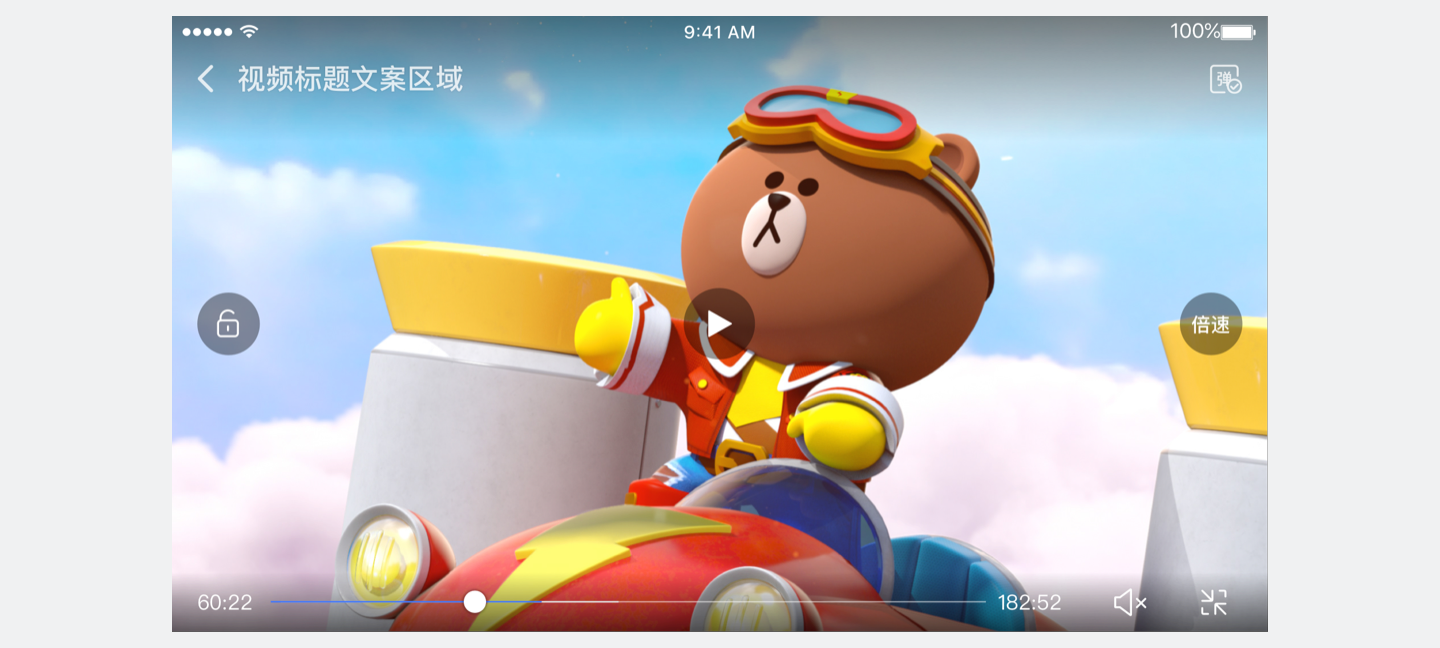
正确
只用一个 play-btn,指引明确
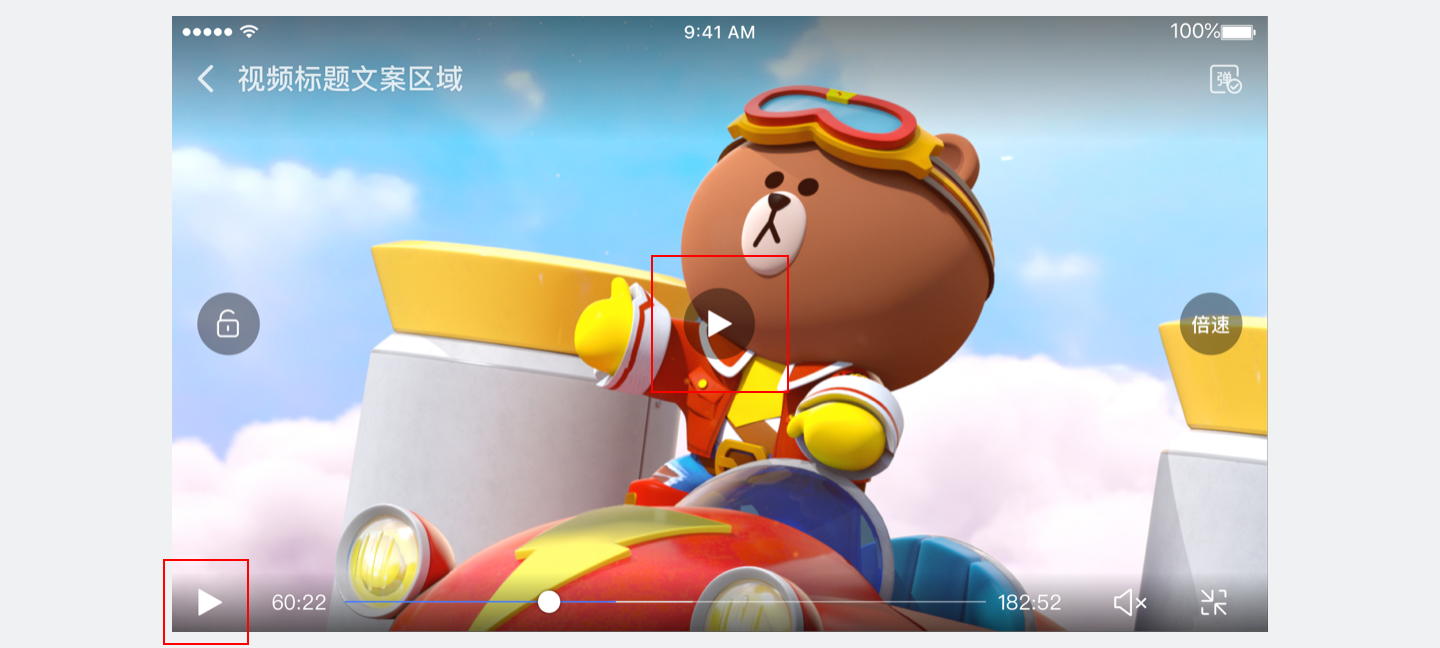
错误
同时使用2个 play-btn,增加用户理解成本
代码示例 2 - controls
<view class="wrap">
    <view class="video-wrap">
        <video
            style="width: 100%;"
            id="myVideo"
            src="{{src}}"
            controls="{{controls}}">
        </video>
    </view>
    <button hover-class="hover" type="primary" bindtap="controls">显示默认播放控件</button>
</view>
Page({
data: {
src: 'https://b.bdstatic.com/swan-temp/940fe716b0eaad38f47b209d61657490.mp4',
controls: true
},
controls() {
this.setData({
controls: !this.data.controls
});
}
})图片示例
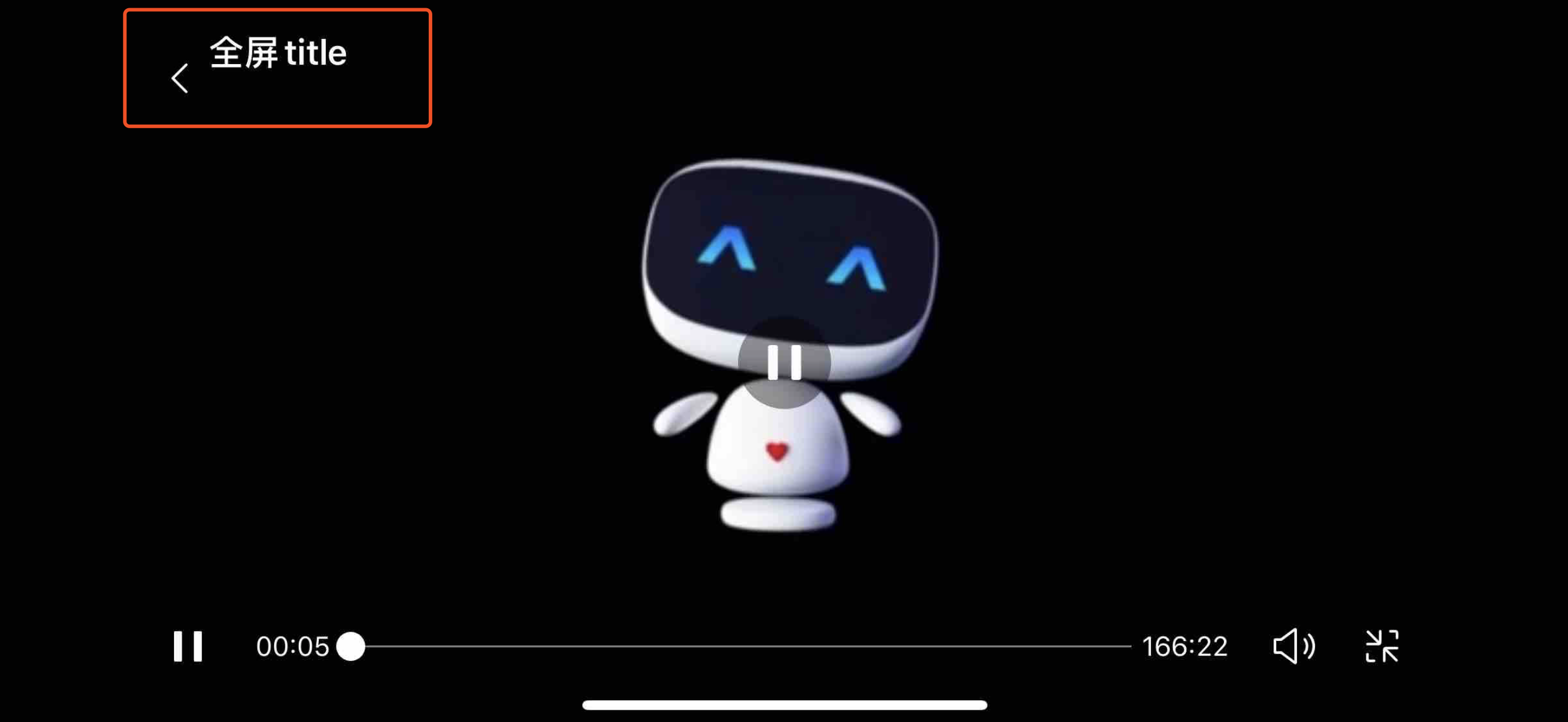
代码示例 3 - title
<view class="wrap">
    <view class="video-wrap">
        <video
            style="width: 100%;"
            id="myVideo"
            src="https://b.bdstatic.com/swan-temp/940fe716b0eaad38f47b209d61657490.mp4" rel="external nofollow"  rel="external nofollow"
            title="全屏title">
        </video>
    </view>
</view>
图片示例
代码示例 4 - direction
<view class="wrap">
    <view class="video-wrap">
        <video
            style="width: 100%;"
            id="myVideo"
            src="{{src}}"
            direction="{{direction}}">
        </video>
    </view>
    <button data-direction="0" type="primary" bindtap="changeFullScreen">正常竖向</button>
    <button data-direction="90" type="primary" bindtap="changeFullScreen">屏幕顺时针90度</button>
    <button data-direction="-90" type="primary" bindtap="changeFullScreen">屏幕逆时针90度</button>
</view>
Page({
data: {
src: 'https://b.bdstatic.com/swan-temp/940fe716b0eaad38f47b209d61657490.mp4',
direction: 0
},
changeFullScreen(e) {
this.setData('direction', +e.target.dataset.direction);
}
});图片示例
代码示例 5 - show-progress
<view class="wrap">
    <view class="video-wrap">
        <video
            style="width: 100%;"
            id="myVideo"
            src="https://b.bdstatic.com/swan-temp/940fe716b0eaad38f47b209d61657490.mp4" rel="external nofollow"  rel="external nofollow"
            show-progress="{{true}}">
        </video>
    </view>
</view>
图片示例
代码示例 6 - show-no-wifi-tip
<view class="wrap">
    <view class="video-wrap">
        <video
            style="width: 100%;"
            id="myVideo"
            src="{{src}}"
            show-no-wifi-tip="{{true}}">
        </video>
    </view>
</view>
Bug & Tip
- Tip:相关 API:createVideoContext
- Tip:<video /> 默认宽度 300px、高度 225px。Tip:v3.70.0 起 video 支持同层渲染,更多请参考 原生组件。
- Tip:同一页面下的 video 标签不应太多,建议不超过 5 个,视频列表功能建议使用 image 列表,选中时替换为 video。
- Tip:避免多个 video 同时播放,视频预览建议使用 gif 方案,使用 video 会降低性能和体验。
Web 态 Tip
Tip1:在部分浏览器下,视频无法自动播放的解决方案
案例分析:出于用户体验、节省流量等原因,iOS 的 Safari、版本号 66 及以上的 Chrome、以及大部分国产移动浏览器禁止视频在非静音状态下自动播放。因此,Web 态针对 video 组件中 autoplay 属性设置为 true 后做了如下处理:
- 对于 QQ、Android 微信、 QQ 浏览器等基于 X5 内核的平台,Web 态下设置的 autoplay = true 不生效,页面进入时,视频组件上显示播放按钮供用户主动点击触发播放。
- 对于其他非 X5 内核的平台,为保证页面进入时可自动播放,会默认关闭声音播放,并显示“取消静音”按钮,供用户主动开启声音。
由于浏览器种类众多,如出现自动播放相关新问题,请将案例反馈给我们,我们将统一记录并反馈进展。
Tip2:视频类资源地址必须有文件扩展名(即文件后缀)
由于浏览器无法解析资源格式。因此对于视频类资源,应在地址中通过后缀名显式声明资源格式,否则可能会导致视频无法正常播放:
- Web 态 video 组件目前支持 mp4、mov、m4v、ogg、m3u8 等格式,参见上述“主流格式支持”小节。
- 当 video 组件的 src 属性值没有文件扩展名,视频会被按照 mp4 格式来进行解码播放。
Tip3:在部分浏览器下,视频播放器会遮挡其他页面元素 / 小窗播放问题的解决方案
案例分析:微信、百度 APP、UC 等浏览器实现了自身的播放器控件,劫持了默认内核提供的播放器样式和逻辑,从而使得基于 H5 video 实现的 Web 态 video 组件出现了以下问题:
- 在 Android 系统的微信平台、百度 APP 和 UC 等国产移动浏览器下,Video 组件的播放器会覆盖到页面其他内容之上,且无法通过 z-index 控制层级,从而导致一些交互失效(比如无法上下滑动触发切换视频)。
- 在 OPPO 手机下的百度 APP,会出现小窗播放。
解决方案:Web 态针对不同浏览器做了尽可能的修复,以解决此问题。已修复的包括 QQ、Android 微信、QQ 浏览器等基于 X5 内核的平台,百度 APP。但由于浏览器种类众多,有可能存在我们暂未覆盖到的情况。如仍遇到上述问题,请您将案例反馈给我们,我们将统一记录并反馈进展。